 By
By Closing the month is one of the best habits you can build. It does not take long, but the clarity it gives you is invaluable. You know exactly where you stand, you catch problems early, and you stay honest about your progress toward financial independence.
I close every month, and I follow the same steps each time. Once it becomes a routine, it feels automatic. You start looking forward to it.
In this article, I walk through the exact 4-step close I follow using Lume - a private FIRE tracker for Mac and iPhone that reads your bank statements on your device. Nothing is fetched on your behalf, and no account is needed unless you opt into end-to-end encrypted sync.
Why close the month?
Most people only check their finances when something goes wrong - when they are anxious about a big purchase, or when their account balance looks lower than expected. That reactive approach is why financial independence feels so distant for so many people. A monthly close flips that around. Instead of reacting to your finances, you are managing them proactively. It can help you:
Spot trends before they become problems. A single high-spending month is noise. Three months in a row is a trend. Without a regular close, you only notice the trend when it has already done damage - a savings rate that quietly slid from 40% to 25%, a debt balance that has barely moved in six months, a net worth that stalled while you thought everything was fine.
Stay honest about your targets. FIRE is a long game - 10, 15, sometimes 20+ years. Over that timescale it is easy to drift. Life gets busy, motivation fades, and the goal becomes abstract. A monthly close keeps it real. It answers the question that actually matters: am I genuinely getting closer to financial independence, or am I just telling myself I am?
Make better decisions with better data. Vague financial awareness leads to vague decisions. When you know your exact savings rate, your net worth trend, and your FI progress, every financial choice becomes clearer. It enables decision making based on facts.
Builds conviction. There is a psychological benefit to showing up consistently. Each close is a small act of financial self-respect. Over time it compounds, just like your investments.
The 4 steps of a monthly close
I close the month on the first weekend after it ends. I sit down with a coffee, download last month’s statements, open Lume, and go through the same four steps every time.
Step 1: Statements
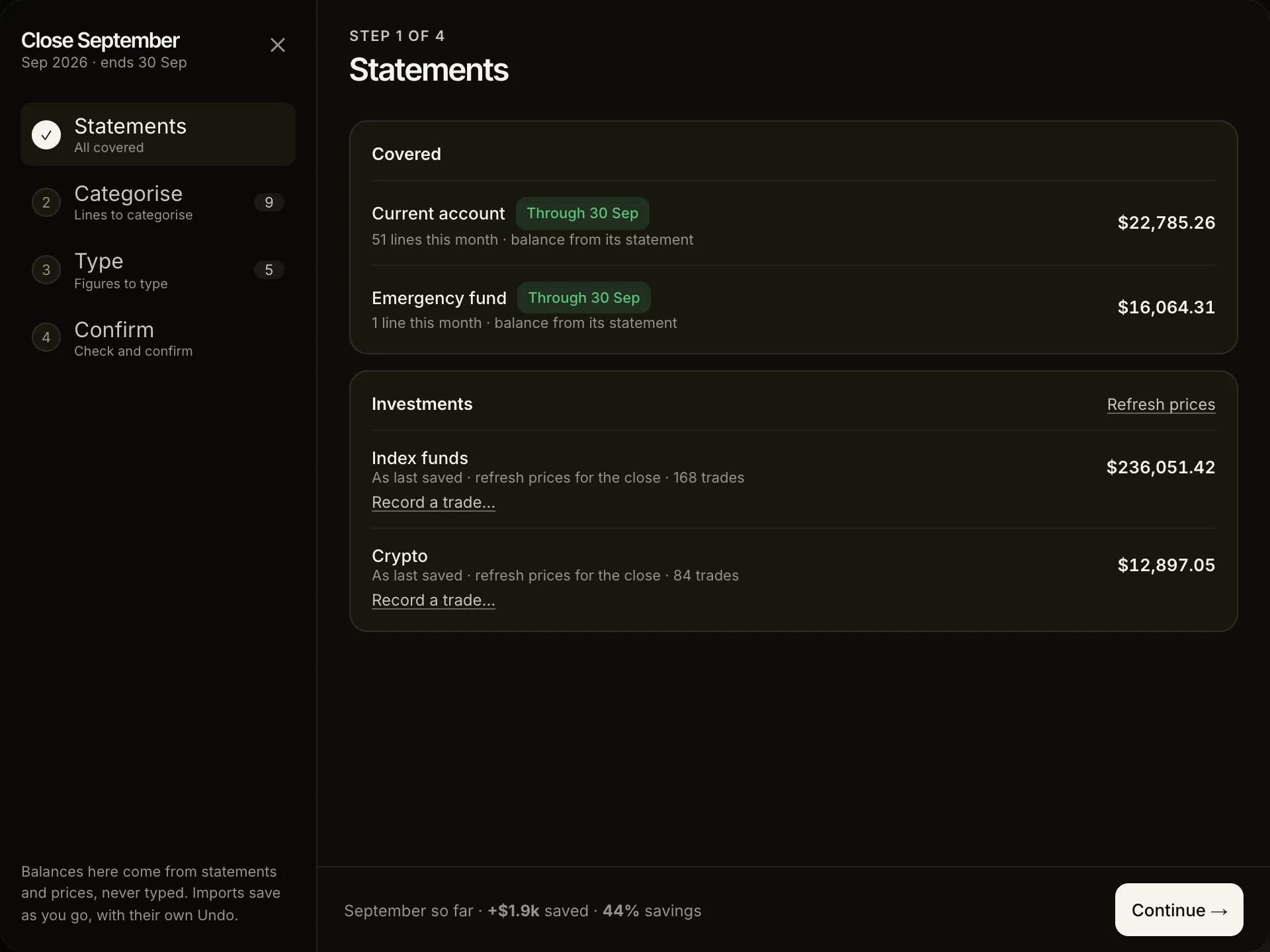
I download last month’s statement from each bank and import it into Lume. The file is read on my Mac and never uploaded. Lume sets every account’s month-end balance from the lines, so there is no balance to look up and none to type. An account that didn’t move gets Nothing happened.
Investments are priced at the close from the trades I imported from my broker. Any trade I made that the broker’s file doesn’t have yet, I record here.
Step 2: Categorise
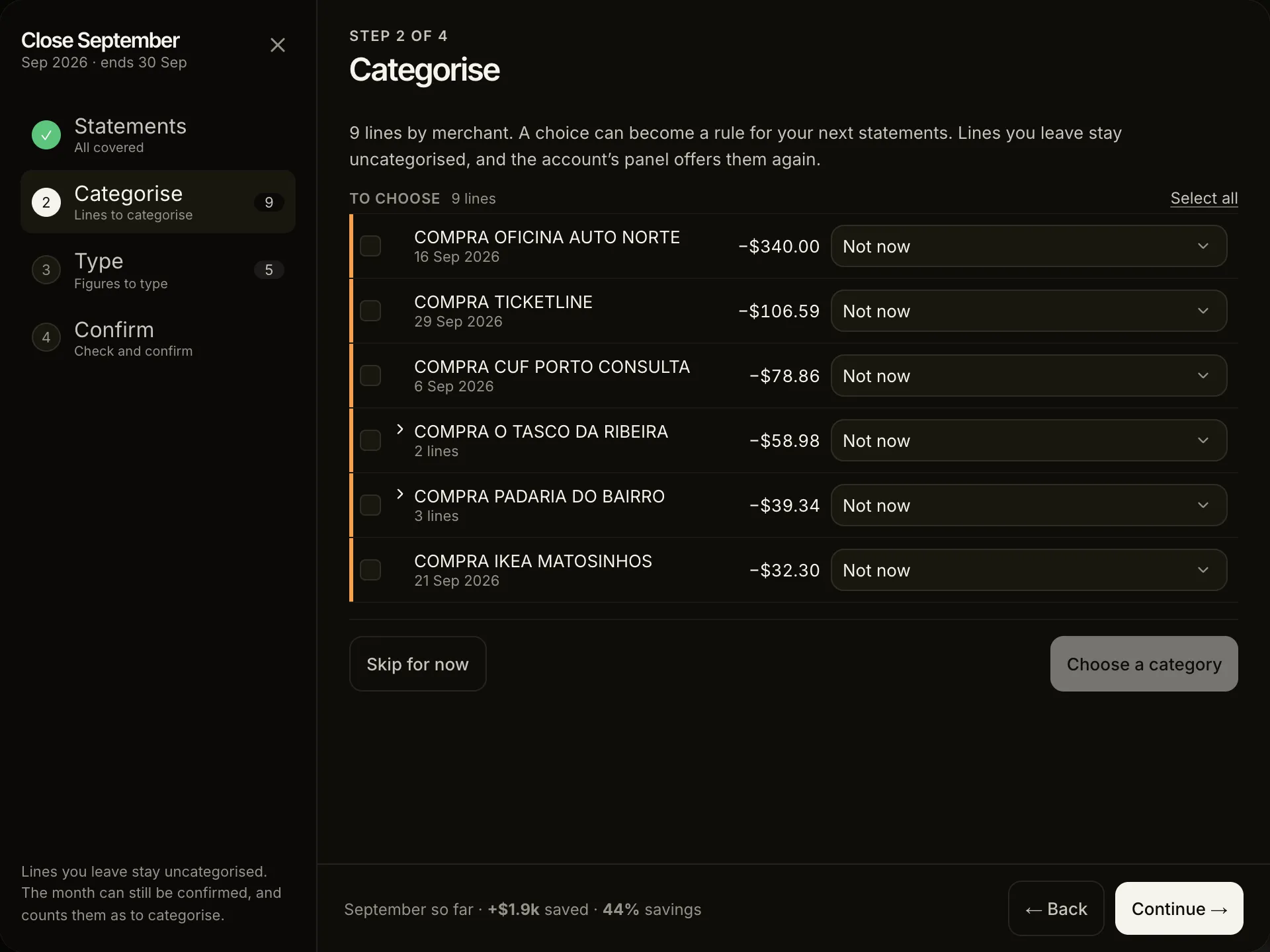
Most lines arrive with Lume’s guess, from the rules I made in earlier months, so I only choose for the merchants it doesn’t know, and a choice can become a rule for next month. Lines are grouped by merchant, so a dozen visits to the same coffee shop are one choice. Transfers between my own accounts pair up and count as neither income nor spending.
I still don’t track spending day to day. Once a month, the statements do the counting and I do the looking.
Lume keeps a split between Survival spending - the expenses essential for staying alive and comfortable - and Non-essential spending - expenses related to lifestyle decisions, which you could live without if you had to. Choosing a line’s category is choosing which side it falls on.
Step 3: Type what no statement gives
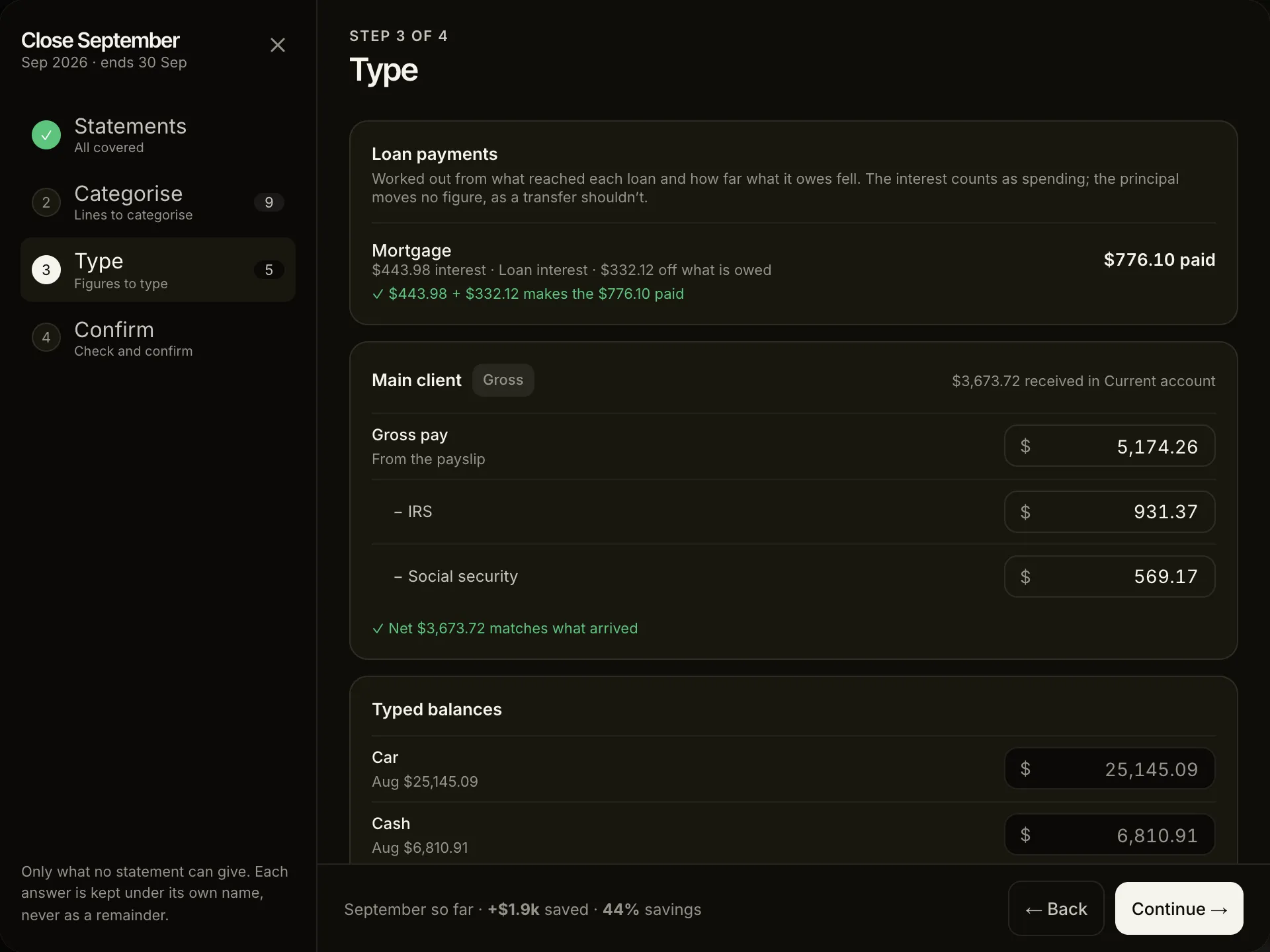
Some figures no statement can give: cash I spent, my payslip’s gross pay and deductions, the value of the car. Each is a named amount, and last month’s cash and balances are offered again, so this step is usually a few confirmations.
You can keep separate income sources for active and passive income. A salary can be a gross source - the statement shows what arrived, and you type the gross and each deduction from the payslip - or a net one, where the statement’s figure is all there is to it. As you get closer to financial independence, the ratio of passive to active income tells you a lot about how close you really are.
Step 4: Confirm
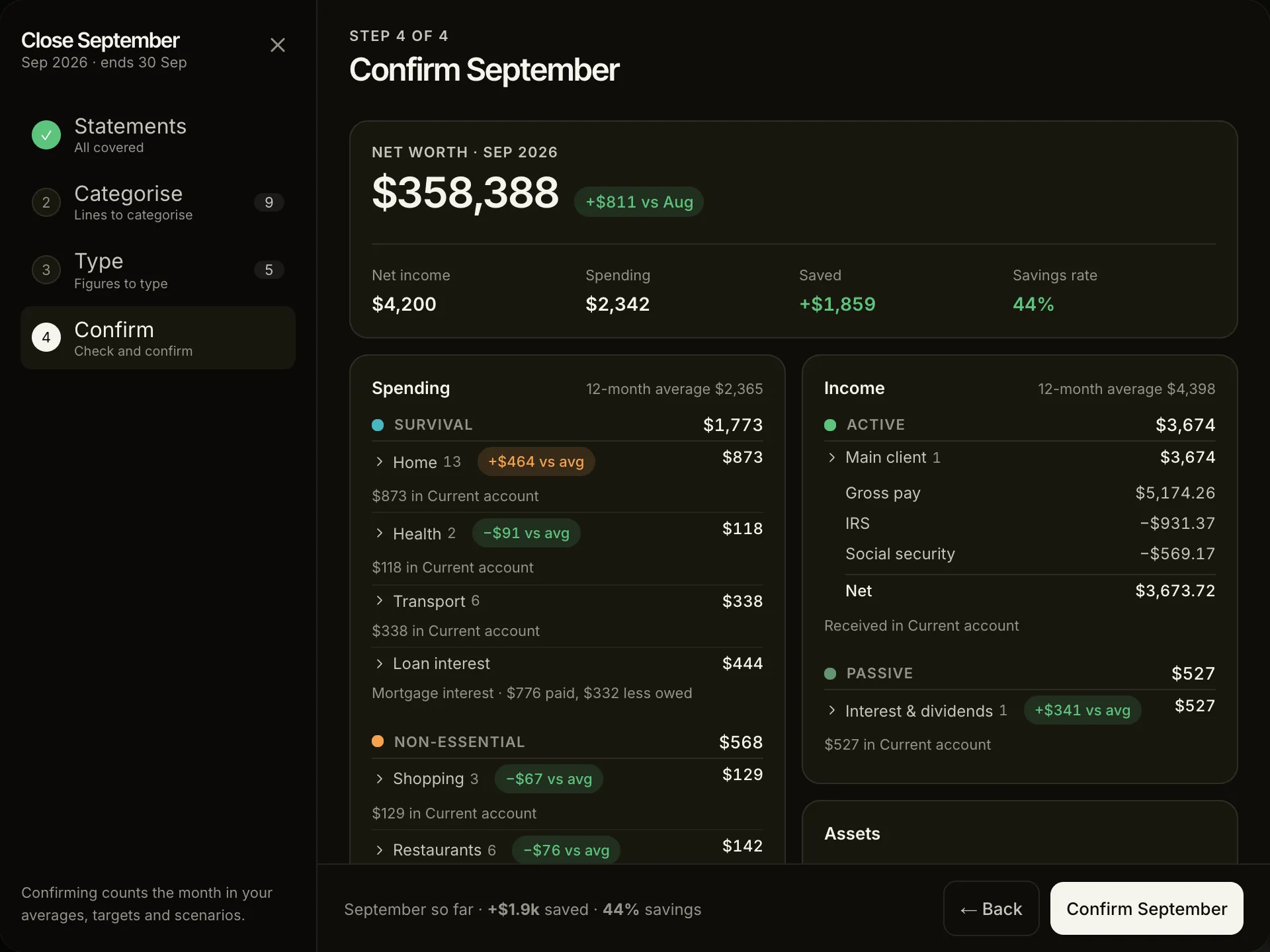
This is the step I actually sit down for. Here I can see at a glance:
- income, spending and every balance, each saying where it came from and opening onto its lines
- the savings rate for the month
- how much my net worth increased (or decreased) vs last month
- which figures are far from their 12-month average, and exactly which lines made them so
- how the month moves the FIRE date in each of my scenarios
The savings rate is the most important single number in FIRE planning. It is more predictive of your timeline than your income, your investment returns, or almost anything else. A moderate earner saving 45% will reach FIRE much faster than a high earner saving 10%.
The net worth variation gives me the sense of the progress towards my FIRE target. And the scenario preview answers the question I actually care about: did this month bring the finish line closer, and by how much?
See your FIRE progress on the dashboard
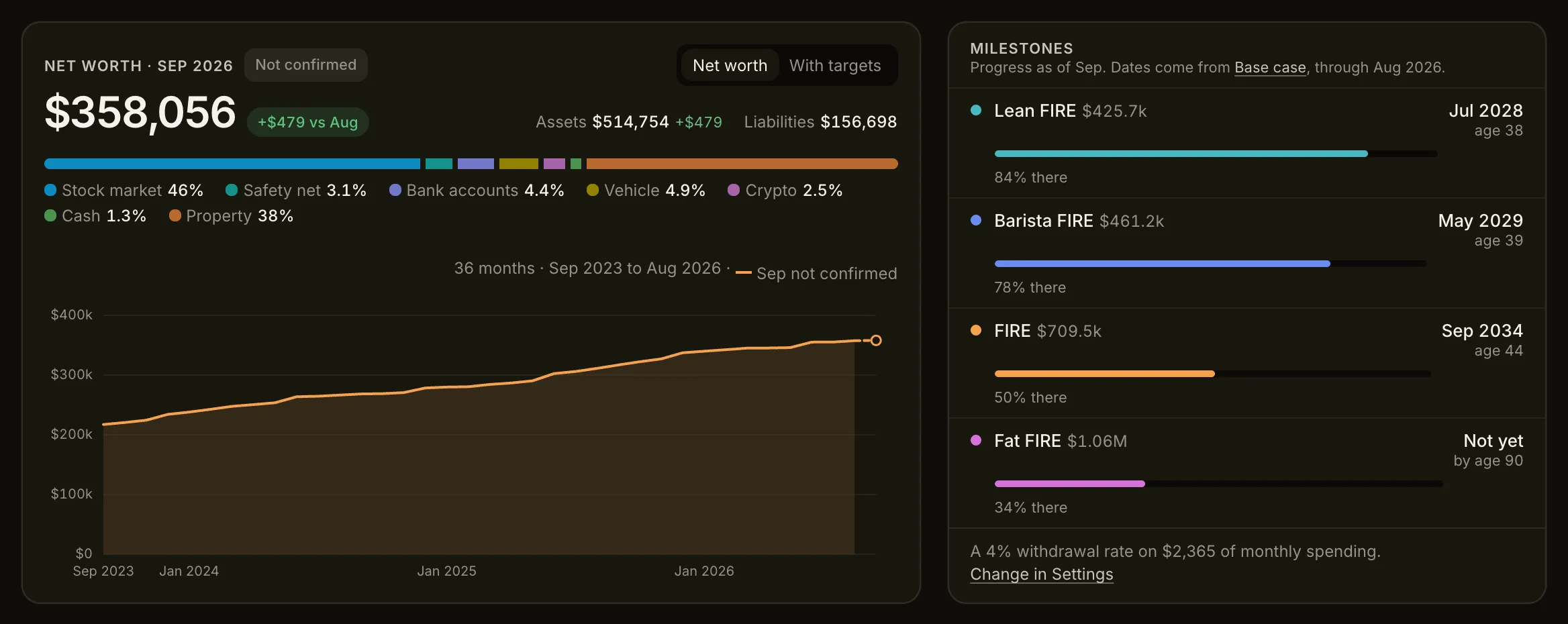
Once you confirm the month, this is where the monthly data connects to the long-term goal. Lume calculates your progress toward four FIRE milestones, based on your current net worth and your 12-month average spending:
- Lean FIRE - a 4% withdrawal covers your essential (survival) expenses
- Barista FIRE - your portfolio covers the spending a part-time income doesn’t
- FIRE - a 4% withdrawal covers all your current expenses indefinitely
- Fat FIRE - a 4% withdrawal funds a multiple of your current spending, for a more generous retirement
Each milestone shows how far along you are, and - once you have a scenario - the month and age you could reach it. Confirming the month updates those dates with the new numbers. Even in months where the market is down, a high savings rate pushes them forward. Once you see that relationship in action, it becomes genuinely motivating.
How long does it take?
The first month takes longest - under an hour, most of it mapping each bank’s columns once and teaching Lume your merchants. By the third month a close takes about ten minutes, and most of that is spent looking at Confirm rather than doing anything.
The key is doing it on the same day every month. The first weekend after the month ends works well. Put it in your calendar, treat it like an appointment, and do not skip it even in months where you know the numbers will not be pretty - those are often the most useful closes of all.
Start this month
You do not need to be a spreadsheet person. You do not need to track every transaction in real time. You just need last month’s statements and a consistent habit. Getting Started takes it from an empty app to a confirmed month, a step at a time.
General information, not financial advice. Your taxes, pension and circumstances will differ from the examples here. More on that.